Data status
Concept overview and key details
Synchronizing a data type ensures that our data cache is up-to-date with the data sourceData source An external platform (such as QuickBooks, Xero, or a bank) that Codat integrates with to pull or push financial data. and means you'll be able to retrieve the synchronized companyCompany In Codat, a company represents your customer's business entity. Companies can have multiple connections to different data sources.'s data using our APIAPI A set of rules and protocols that allows different software applications to communicate with each other. Codat provides APIs for accessing financial data from accounting, banking, and commerce platforms. or view the data in the Portal.
There are three ways to initiate the synchronization of data:
- Queue a syncSync The process of fetching the latest data from a connected data source. Syncs can be triggered manually or run automatically on a schedule. to refresh the data from within Codat's Portal
- Use the APIAPI A set of rules and protocols that allows different software applications to communicate with each other. Codat provides APIs for accessing financial data from accounting, banking, and commerce platforms. to queue a data synchronization (known as a dataset)
- Use the SyncSync The process of fetching the latest data from a connected data source. Syncs can be triggered manually or run automatically on a schedule. settings feature in the Codat Portal
By default, full synchronization of each data type marked as Fetch on first linkLink The authorization flow that allows end users to connect their accounting, banking, or commerce platforms to your application via Codat. in your data type settings will be queued automatically when a companyCompany In Codat, a company represents your customer's business entity. Companies can have multiple connections to different data sources. first authorizes itself with Codat.
Dataset statuses
All datasets are created in the Queued state. For online packages, the transition to Fetching will be near instant. For on-premise packages, the synchronization will remain Queued until the on-premises connector on the end user's machine is online and ready to process the dataset.
A dataset going to the AuthError state indicates that the connectionConnection A link between a Codat company and a data source (like an accounting platform). Each connection represents authorized access to pull or push data from that platform. to the data sourceData source An external platform (such as QuickBooks, Xero, or a bank) that Codat integrates with to pull or push financial data. is no longer authorized and will require the companyCompany In Codat, a company represents your customer's business entity. Companies can have multiple connections to different data sources. to re-authorize your connectionConnection A link between a Codat company and a data source (like an accounting platform). Each connection represents authorized access to pull or push data from that platform. before you're able to complete subsequent data synchronizations for that connectionConnection A link between a Codat company and a data source (like an accounting platform). Each connection represents authorized access to pull or push data from that platform..
Other error states may be resolved by queueing a new synchronization after waiting some time. For example, you may see datasets go to FetchError if you attempt a synchronization during a period of scheduled maintenance for the underlying data sourceData source An external platform (such as QuickBooks, Xero, or a bank) that Codat integrates with to pull or push financial data..
Datasets can also transition to the NotSupported state if the dataset you are trying to syncSync The process of fetching the latest data from a connected data source. Syncs can be triggered manually or run automatically on a schedule. is not supported by the linked platform.
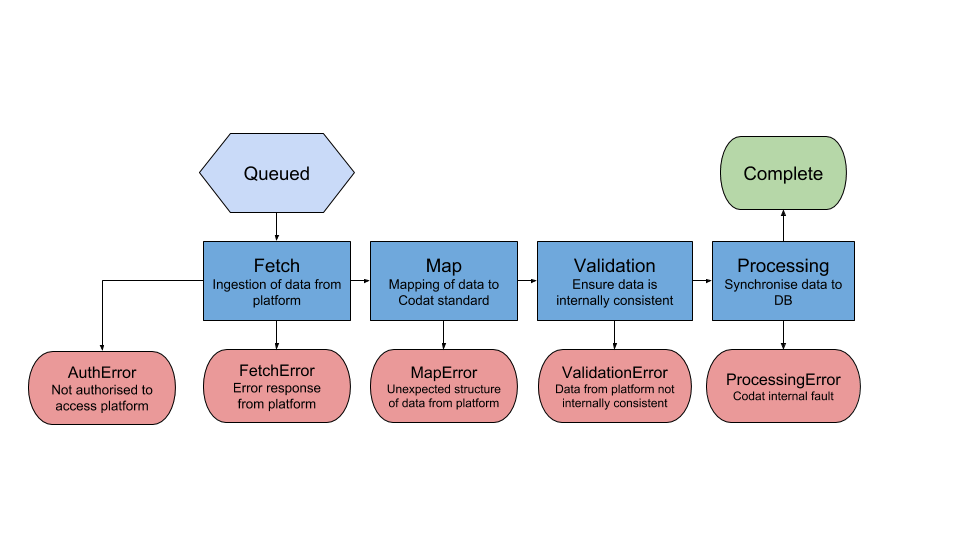
| State | Description |
|---|---|
| Fetching | The data is currently being read from the integration. |
| Mapping | The data is being converted into Codat's standard model. |
| Validating | The data is being checked for consistency and correctness. |
| Processing | The data is being stored into Codat's cache. |
| Complete | The dataset has completed, and the data is available to be queried via Codat's APIAPI A set of rules and protocols that allows different software applications to communicate with each other. Codat provides APIs for accessing financial data from accounting, banking, and commerce platforms.. |
| NotSupported | The integration does not support the datatype that was requested. For example, Clearbooks does not support reading the Profit and Loss Report. |
| FetchError, MapError, ValidationError, ProcessingError, InternalError | The dataset failed in one of the above states. These are monitored by our engineering teams, but you may contact support team for assistance as required. |
| AuthError | The authentication to the data sourceData source An external platform (such as QuickBooks, Xero, or a bank) that Codat integrates with to pull or push financial data. has expired. This usually means you will need to relink, by getting the end user to follow the data connectionsConnection A link between a Codat company and a data source (like an accounting platform). Each connection represents authorized access to pull or push data from that platform.'s linkUrl to re-enter their credentials. |
| Queued | The dataset has just been requested, and will move into fetching shortly. |
Examples
Data type that has never been synced
{
  "suppliers": {
    "dataType": "suppliers”
  },
  ...
}
First syncSync The process of fetching the latest data from a connected data source. Syncs can be triggered manually or run automatically on a schedule. for the data type failed
{
  "suppliers": {
    "dataType": "suppliers",
    "currentStatus": "FetchError",
    "latestSyncId": "31632c48-23dc-4cb1-b3ff-0829343c8e85",
  },
  ...
}
Last syncSync The process of fetching the latest data from a connected data source. Syncs can be triggered manually or run automatically on a schedule. failed although a previous syncSync The process of fetching the latest data from a connected data source. Syncs can be triggered manually or run automatically on a schedule. was successful
{
  "suppliers": {
    "dataType": "suppliers",
    "lastSuccessfulSync": "2019-10-10T00:31:04.497225Z",
    "currentStatus": "FetchError",
    "latestSyncId": "31632c48-23dc-4cb1-b3ff-0829343c8e85",
    "latestSuccessfulSyncId": "9d6d3754-deeb-42b7-ad37-e10942f9e258"
  },
  ...
}
SyncSync The process of fetching the latest data from a connected data source. Syncs can be triggered manually or run automatically on a schedule. was successful
{
  "suppliers": {
    "dataType": "suppliers",
    "lastSuccessfulSync": "2019-10-10T00:31:04.497225Z",
    "currentStatus": "Complete",
    "latestSyncId": "31632c48-23dc-4cb1-b3ff-0829343c8e85",
    "latestSuccessfulSyncId": "31632c48-23dc-4cb1-b3ff-0829343c8e85"
  },
  ...
}