First steps with Codat
A practical introduction to Codat's Portal and API
You need an account and APIAPI A set of rules and protocols that allows different software applications to communicate with each other. Codat provides APIs for accessing financial data from accounting, banking, and commerce platforms. key to follow this guide. Get in touch to discuss creating an account today.
In this guide...
With Codat, you can more easily build integrated financial products for SMBsSMB The primary customer segment that Codat helps businesses serve, typically companies with annual revenues under $500 million..
Set up your customers by adding them as companies in Codat. Then, establish authorized connectionsConnection A link between a Codat company and a data source (like an accounting platform). Each connection represents authorized access to pull or push data from that platform. to the customers' accounting, banking, or commerce software using one of our integrations.
Finally, review and analyze the data relevant to your use case, which Codat reads from your SMBSMB The primary customer segment that Codat helps businesses serve, typically companies with annual revenues under $500 million. customers' data sourcesData source An external platform (such as QuickBooks, Xero, or a bank) that Codat integrates with to pull or push financial data..
This guide is aimed at developers and non-developers alike. In three easy steps, you will create a companyCompany In Codat, a company represents your customer's business entity. Companies can have multiple connections to different data sources., linkLink The authorization flow that allows end users to connect their accounting, banking, or commerce platforms to your application via Codat. it to Codat's sandbox, and review its financial data to get acquainted with Codat's solution.
Your free account comes equipped with an example companyCompany In Codat, a company represents your customer's business entity. Companies can have multiple connections to different data sources.. Navigate to Companies in the Codat Portal and click the demo companyCompany In Codat, a company represents your customer's business entity. Companies can have multiple connections to different data sources. to examine data relevant for your use case.
You can perform each step in the Codat Portal or using our APIAPI A set of rules and protocols that allows different software applications to communicate with each other. Codat provides APIs for accessing financial data from accounting, banking, and commerce platforms..

Developer prerequisites
If you are a developer and want to work with Codat using our API reference or by making calls to our APIAPI A set of rules and protocols that allows different software applications to communicate with each other. Codat provides APIs for accessing financial data from accounting, banking, and commerce platforms. in code, you first need to authenticate.
Authenticate with Codat's API
Authorization headers can only be viewed and copied by users with Administrator or Developer roles.
Codat uses APIAPI A set of rules and protocols that allows different software applications to communicate with each other. Codat provides APIs for accessing financial data from accounting, banking, and commerce platforms. keys, Base64 encoded within an authorization header, to control access to the APIAPI A set of rules and protocols that allows different software applications to communicate with each other. Codat provides APIs for accessing financial data from accounting, banking, and commerce platforms.. To copy your authorization header, navigate to Developers > APIAPI A set of rules and protocols that allows different software applications to communicate with each other. Codat provides APIs for accessing financial data from accounting, banking, and commerce platforms. keys in the Codat Portal.
Then, replace {basicAuthHeader} in the code snippets below.
- C#
- TypeScript
- Python
- Go
Installation
dotnet add package Codat.Platform
Authentication
  using CodatPlatform;
  using CodatPlatform.Models.Shared;

  var codatPlatform = new CodatPlatformSDK(
      security: new Security() {
          AuthHeader = "{basicAuthHeader}",
      }
  );
Installation
npm add @codat/platform
or
yarn add @codat/platform
Authentication
import { CodatPlatform } from "@codat/platform";

const codatPlatform = new CodatPlatform({
  authHeader: "{basicAuthHeader}",
});
You can read more about authentication at Codat, or proceed to create your first companyCompany In Codat, a company represents your customer's business entity. Companies can have multiple connections to different data sources..
1. Create a companyCompany In Codat, a company represents your customer's business entity. Companies can have multiple connections to different data sources.
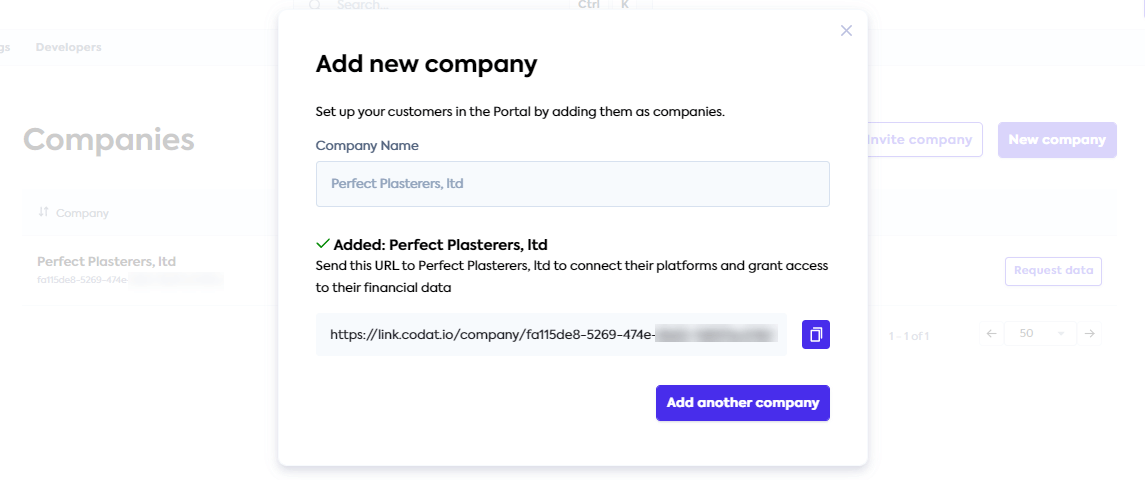
Set up your SMBSMB The primary customer segment that Codat helps businesses serve, typically companies with annual revenues under $500 million. customer by adding them as a companyCompany In Codat, a company represents your customer's business entity. Companies can have multiple connections to different data sources.. In the Codat Portal, navigate to Companies > New companyCompany In Codat, a company represents your customer's business entity. Companies can have multiple connections to different data sources.. The "Add new companyCompany In Codat, a company represents your customer's business entity. Companies can have multiple connections to different data sources." dialog appears.
Enter the name you want to give the entity that represents your SMBSMB The primary customer segment that Codat helps businesses serve, typically companies with annual revenues under $500 million. customer and click Add. A success message pops up, providing a connectionConnection A link between a Codat company and a data source (like an accounting platform). Each connection represents authorized access to pull or push data from that platform. URL. Normally, you would share this URL with your customer so they can authorize a connectionConnection A link between a Codat company and a data source (like an accounting platform). Each connection represents authorized access to pull or push data from that platform. with Codat.
Copy this URL for use in the next step. Note that this URL can be accessed again at any time in the future.
Create a company using Codat's API
To create a companyCompany In Codat, a company represents your customer's business entity. Companies can have multiple connections to different data sources. in Codat, use the POST /companies endpoint with a request body containing the name of the companyCompany In Codat, a company represents your customer's business entity. Companies can have multiple connections to different data sources.. It does not have to be unique and serves to identify your customer in Codat.
- C#
- TypeScript
- Python
- Go
- cURL
using CodatPlatform.Models.Shared;

var res = await codatPlatform.Companies.CreateAsync(new CompanyRequestBody() {
    Description = "Requested early access to the new financing scheme.",
    Name = "Bank of Dave",
});

if(res.Company != null) {
  logger.LogInformation('{CompanyId} {CompanyName}', res.Company.Id, res.Company.Name)
}
codatPlatform.companies
  .create({
    description: "Requested early access to the new financing scheme.",
    name: "Bank of Dave",
  })
  .then((res) => {
    // handle response
  });
  req = shared.CompanyRequestBody(
    description='Requested early access to the new financing scheme.',
    name='Bank of Dave',
  )

  res = codat_platform.companies.create(req)

  if res.company is not None:
    print(res.company.id, res.company.name)
import(
  "github.com/codatio/client-sdk-go/platform/pkg/models/shared"
  "fmt"
)

ctx := context.Background()

res, err := codatPlatform.Companies.Create(ctx, shared.CompanyRequestBody{
  Description: codatplatform.String("Requested early access to the new financing scheme."),
  Name: "Bank of Dave",
})

if err != nil {
  log.Fatal(err)
}

if res.Company != nil {
    fmt.Println("%s %s", res.Company.Id, res.Company.Name)
}
  curl --request POST \
      --url "https://api.codat.io/companies" \
      --header "Authorization: $CODAT_AUTH_HEADER" \
      --header "accept: application/json" \
      --header "content-type: application/json" \
      --data '{
              "name": "SMB company name",
              "description": "Any additional information about the company"
      }
The endpoint returns a JSON response, confirming the unique id of the companyCompany In Codat, a company represents your customer's business entity. Companies can have multiple connections to different data sources. and a redirect URL used to establish a connectionConnection A link between a Codat company and a data source (like an accounting platform). Each connection represents authorized access to pull or push data from that platform. with a data sourceData source An external platform (such as QuickBooks, Xero, or a bank) that Codat integrates with to pull or push financial data..
Retain the id and redirect URL for use in the next steps.
You can also use the Create company endpoint in our APIAPI A set of rules and protocols that allows different software applications to communicate with each other. Codat provides APIs for accessing financial data from accounting, banking, and commerce platforms. reference to try this out.
2. Create a sandbox data connectionConnection A link between a Codat company and a data source (like an accounting platform). Each connection represents authorized access to pull or push data from that platform.
Next, connect your companyCompany In Codat, a company represents your customer's business entity. Companies can have multiple connections to different data sources. to our Sandbox to make use of mock accounting, commerce, and banking data. It gives you access to many of the data types and operations supported by Codat.
If you have retained the connectionConnection A link between a Codat company and a data source (like an accounting platform). Each connection represents authorized access to pull or push data from that platform. URL from the previous step, simply open it in a new browser tab.
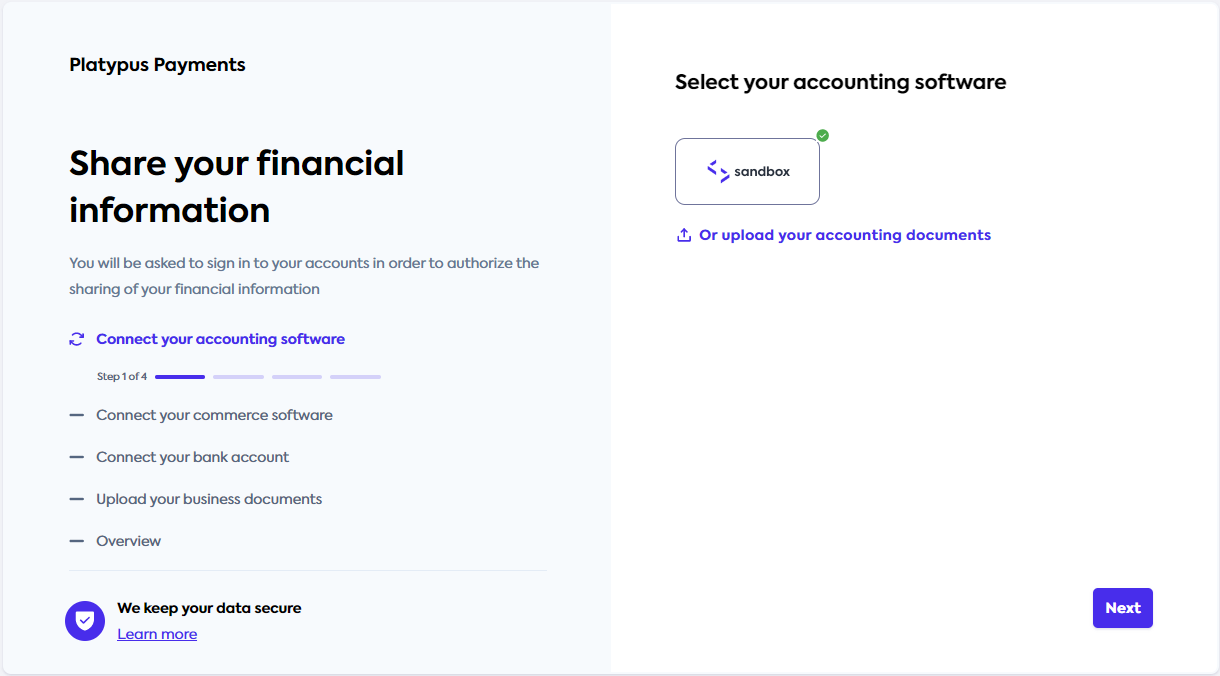
If you need to view the URL again, navigate to Companies in the Codat Portal. Next, find the companyCompany In Codat, a company represents your customer's business entity. Companies can have multiple connections to different data sources. you created for the customer, and click Request data next to the companyCompany In Codat, a company represents your customer's business entity. Companies can have multiple connections to different data sources. name. Copy the LinkLink The authorization flow that allows end users to connect their accounting, banking, or commerce platforms to your application via Codat. URL and open it in the new tab.
This opens Codat's authorization flow built using our LinkLink The authorization flow that allows end users to connect their accounting, banking, or commerce platforms to your application via Codat. feature.
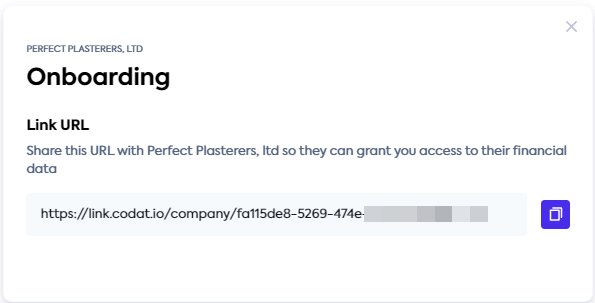
Follow the flow and select Codat Sandbox as your source of accounting, commerce, and banking data. You don't need to enter any credentials. Skip the step of uploading business documents.
When all Sandbox connectionsConnection A link between a Codat company and a data source (like an accounting platform). Each connection represents authorized access to pull or push data from that platform. are complete, you'll see a confirmation message. You can now close the tab. Meanwhile, Codat reads the Sandbox data via the established connectionConnection A link between a Codat company and a data source (like an accounting platform). Each connection represents authorized access to pull or push data from that platform..
Link to Sandbox using Codat's API
Pick up the redirect URL returned in the response body of the companyCompany In Codat, a company represents your customer's business entity. Companies can have multiple connections to different data sources. creation step and open it in a new browser window.
Follow the flow to connect to the Codat Sandbox as your source of accounting, commerce, and banking data. You don't need to enter any credentials.
Once the flow is complete, you can verify the companyCompany In Codat, a company represents your customer's business entity. Companies can have multiple connections to different data sources.'s status under the View a single company endpoint.
Remember to replace {companyId} with your companyCompany In Codat, a company represents your customer's business entity. Companies can have multiple connections to different data sources. id obtained previously.
- C#
- TypeScript
- Python
- Go
- cURL
using CodatPlatform.Models.Shared;
using CodatPlatform.Models.Operations;
using System.Net;

var res = await sdk.Companies.GetAsync(new GetCompanyRequest() {
  CompanyId = "{companyId}",
});

if res.statusCode == (int)HttpStatusCode.OK {
  logger.LogInformation("{Redirect}", res.Company.Redirect)
}
codatPlatform.companies
  .get({
    companyId: "{companyId}",
  })
  .then((res) => {
    //handle response
  });
  req = operations.GetCompanyRequest(
    company_id='{companyId}',
  )

  res = codat_platform.companies.get(req)

  if res.company is not None:
    print(res.company.redirect)
import(
  "github.com/codatio/client-sdk-go/common/pkg/models/shared"
  "fmt"
)

ctx := context.Background()

res, err := s.Companies.Get(ctx, operations.GetCompanyRequest{
      CompanyID: "{companyId}",
  })

if err != nil {
  log.Fatal(err)
}

if res.Company != nil {
    fmt.Println("%s",res.Company.Redirect)
}
  curl --request GET \
      --url "https://api.codat.io/companies/{companyId}" \
      --header "Authorization: $CODAT_AUTH_HEADER" \
      --header "accept: application/json"
In the JSON response, you can see that the the status of data connectionsConnection A link between a Codat company and a data source (like an accounting platform). Each connection represents authorized access to pull or push data from that platform. changed to linked.
On first connectionConnection A link between a Codat company and a data source (like an accounting platform). Each connection represents authorized access to pull or push data from that platform., Codat reads data from the data sourceData source An external platform (such as QuickBooks, Xero, or a bank) that Codat integrates with to pull or push financial data. immediately. You can also use the Get company data status endpoint to confirm the syncSync The process of fetching the latest data from a connected data source. Syncs can be triggered manually or run automatically on a schedule. was successful.
Now you are ready to examine the companyCompany In Codat, a company represents your customer's business entity. Companies can have multiple connections to different data sources.'s financial data and view the datasets relevant to your use case.
3. Examine companyCompany In Codat, a company represents your customer's business entity. Companies can have multiple connections to different data sources. data for your use case
Navigate back to the Companies page in the Codat Portal. You will see your newly created companyCompany In Codat, a company represents your customer's business entity. Companies can have multiple connections to different data sources., along with the connectionsConnection A link between a Codat company and a data source (like an accounting platform). Each connection represents authorized access to pull or push data from that platform. to the Accounting, Commerce, and Banking Sandboxes that were connected in the previous step.
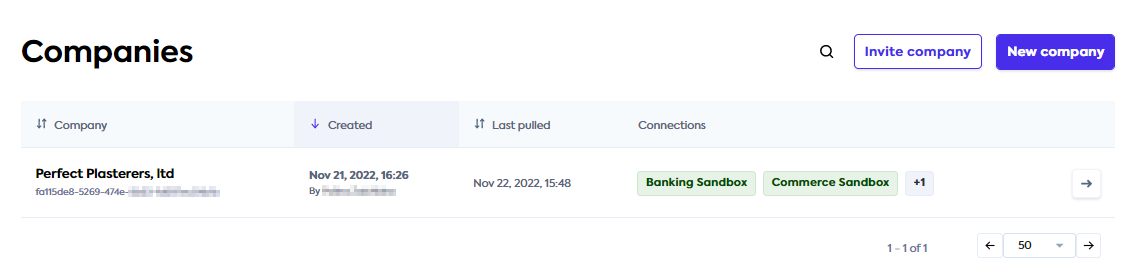
Now, click the companyCompany In Codat, a company represents your customer's business entity. Companies can have multiple connections to different data sources. name and use the side menu to navigate to Products. You can review the data read by Codat's accounting, banking, and commerce APIsAPI A set of rules and protocols that allows different software applications to communicate with each other. Codat provides APIs for accessing financial data from accounting, banking, and commerce platforms.. Switch between the data types using the dropdown on the right, and view and export data as needed for your use case.
Here, we review the SMBSMB The primary customer segment that Codat helps businesses serve, typically companies with annual revenues under $500 million. customer's invoice data read from the accounting Sandbox. This data helps with business forecasts and cash flow management based on sales changes over time, average payment timelines, and amounts related to the invoices.
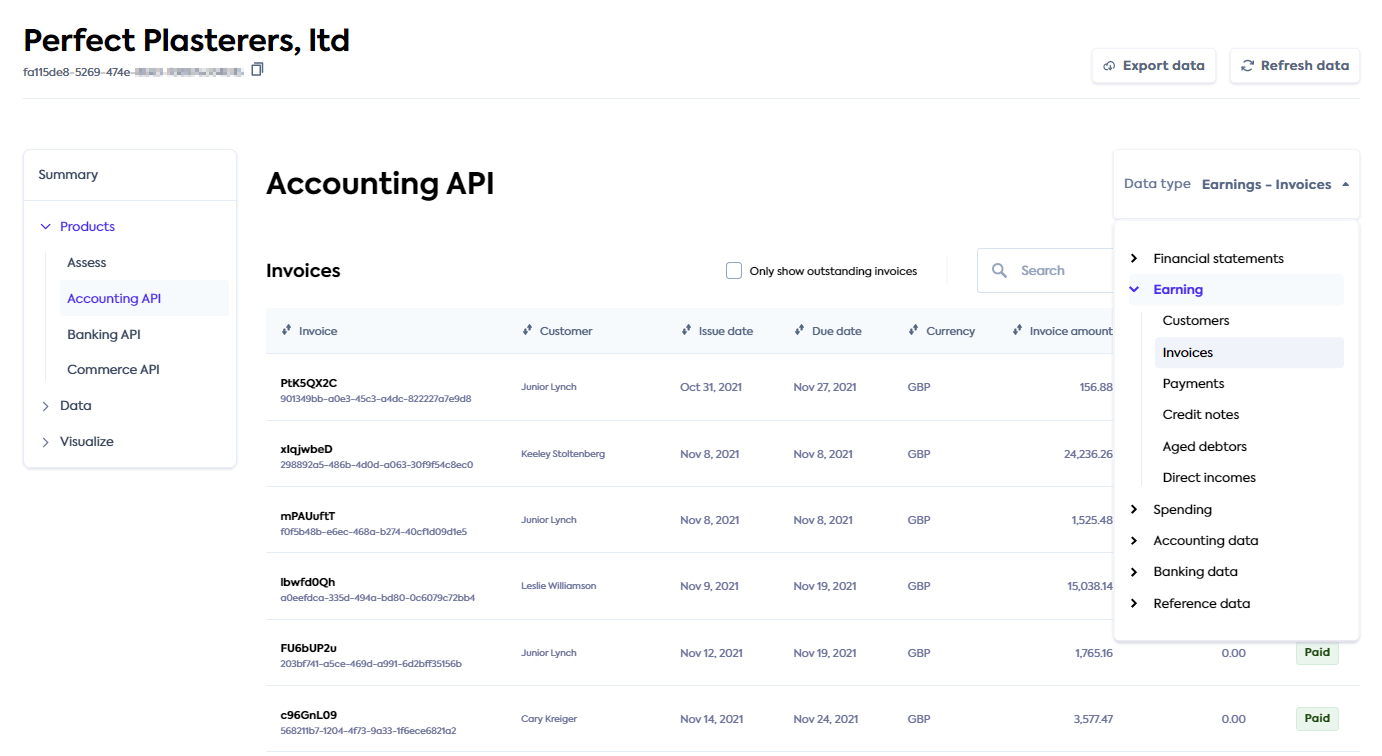
Developers can also use the Portal to review how Codat polled for a specific data type and the results it received at the bottom of each data type page.
Access company data using Codat's API
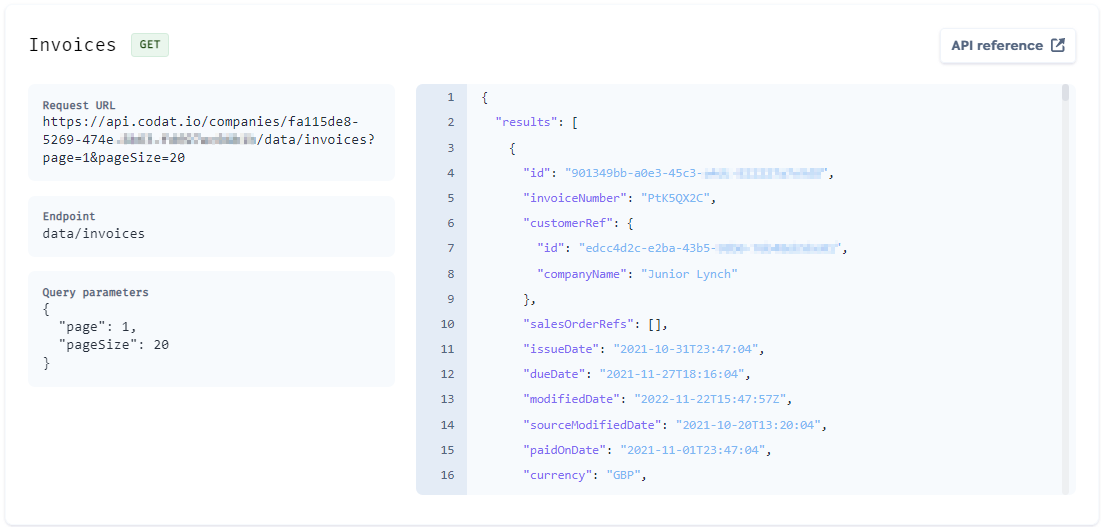
Codat provides various endpoints for you to query each of the supported data types easily.
For example, to query invoices, use the All invoices endpoint. You can perform filtering on the response data using querying. In this guide, we are using page and pageSize parameters to read ten invoices for the companyCompany In Codat, a company represents your customer's business entity. Companies can have multiple connections to different data sources. we created earlier.
Remember to replace {companyId} with your companyCompany In Codat, a company represents your customer's business entity. Companies can have multiple connections to different data sources. id obtained previously.
- C#
- TypeScript
- Python
- Go
- cURL
Installation
dotnet add package Codat.Lending
Usage
using CodatLending;
using CodatLending.Models.Shared;
using CodatLending.Models.Operations;

var codatLending = new CodatLendingSDK(
  security: new Security() {
        AuthHeader = "{basicAuthHeader}",
    }
);

var res = await codatLending.AccountsReceivable.Invoices.ListAsync(new ListAccountingInvoicesRequest() {
    CompanyId = "8a210b68-6988-11ed-a1eb-0242ac120002",
});

if(res.StatusCode == (int)HttpStatusCode.OK){
  logger.LogInformation(res.invoices.results[0].Id)
}
Installation
npm add @codat/lending
or
yarn add @codat/lending
Usage
import { CodatLending } from "@codat/lending";

const codatLending = new CodatLending({
  authHeader: "{basicAuthHeader}",
});

codatLending.accountsReceivable.invoices
  .list({
    companyId: "{companyId}",
  })
  .then((res) => {
    //handle response
  });
Installation
pip install codat-lending
Usage
from codat_lending import CodatLending
from codat_lending.models import operations, shared

codat_lending = CodatLending(
    security=shared.Security(
        auth_header="{basicAuthHeader}",
    ),
)

res = codat_lending.accounts_receivable.invoices.list(request={
        "company_id": "8a210b68-6988-11ed-a1eb-0242ac120002"
    })

if res:
  # handle response
  pass
Installation
go get github.com/codatio/client-sdk-go/lending
Usage
package main

import(
  "context"
  "log"
  "github.com/codatio/client-sdk-go/lending"
  "github.com/codatio/client-sdk-go/lending/pkg/models/operations"
  "fmt"
)

func main() {
    codatLending := codatlending.New(
        codatlending.WithSecurity(shared.Security{
            AuthHeader: "{basicAuthHeader}",
        }),
    )

    ctx := context.Background()
    res, err := codatLending.AccountsReceivable.Invoices.List(ctx, operations.ListInvoicesRequest{
        CompanyID: "{companyId}"
    })

    if err != nil {
        log.Fatal(err)
    }

    if res.Invoices != nil {
      fmt.Println("%s ",res.AccountingInvoices.Results[0].id)
    }
}
  curl --request GET \
      --url "https://api.codat.io/companies/{companyId}/data/invoices?page=1&pageSize=10" \
      --header "Authorization: {basicAuthHeader}" \
      --header "accept: application/json"
In the JSON response, the APIAPI A set of rules and protocols that allows different software applications to communicate with each other. Codat provides APIs for accessing financial data from accounting, banking, and commerce platforms. provides ten detailed invoices as a result.
You can also use the Portal to review how Codat polled for a specific data type and the results it received at the bottom of each data type page.
You have now:
- created a Codat companyCompany In Codat, a company represents your customer's business entity. Companies can have multiple connections to different data sources. that represents your small business customer,
- authorized sandbox connectionsConnection A link between a Codat company and a data source (like an accounting platform). Each connection represents authorized access to pull or push data from that platform. to read various financial data, and
- reviewed the data and its visual representation, relating it to your use case.
Next steps
Want to read and view data from a different platform?
Codat enables you to connect to over 30 different accounting, banking, and commerce software. You can choose to read data from a platform most relevant to you.
Navigate to Settings > Integrations in the Portal. Choose the integration type, find the platform you need, and set it up. Once you've enabled the platform, create a data connectionConnection A link between a Codat company and a data source (like an accounting platform). Each connection represents authorized access to pull or push data from that platform. to it, as you have done with the Sandbox earlier. You will need valid credentials for the platform you are trying to linkLink The authorization flow that allows end users to connect their accounting, banking, or commerce platforms to your application via Codat..
You can review our detailed instructions for setting up integrations like Xero, QuickBooks Online, PayPal, Plaid, and many more.
Curious about what other data Codat can provide you with?
Codat reads a variety of data types from the source platforms, making it easy to suit the needs of your use case.
With our accounting integrations, you can read financial statements, earning and spending detail, journal entries, tax details, and many more. Our banking integrations provide you with banking transactions, accounts, and account balances. Finally, our commerce integrations can show you details of orders, customers, payments, products, and others.
Keen to customize the look and feel of the auth flow?
Colors, logos, and icons of Codat's authorization flow can be changed for a bespoke experience. Navigate to Settings > Auth flow > Branding in the Codat Portal and adjust to fit the flow to your brand's palette.
Then, use the LinkLink The authorization flow that allows end users to connect their accounting, banking, or commerce platforms to your application via Codat. URL of the companyCompany In Codat, a company represents your customer's business entity. Companies can have multiple connections to different data sources. you created earlier to review your customer's experience with the flow. You can even take the customization one step further and amend the accompanying text and behaviors.
Want to migrate your existing integration to Codat?
If you already have an OAuth application with one of our supported integrations, you can seamlessly migrate your customers' connectionsConnection A link between a Codat company and a data source (like an accounting platform). Each connection represents authorized access to pull or push data from that platform. — without your customers needing to reconnect.
You can choose a self-service token migration, or engage us for a managed migration. Choose the option that best suits your use case.