FAQs
Frequently asked questions about our QuickBooks Desktop on-premise connector.
Do I need to run the QBD connector on the same machine where QuickBooks is installed?
Yes. Any user journey should make it clear that the user must run the connector on the machine they use to access QuickBooks. Functionality to email a linkLink The authorization flow that allows end users to connect their accounting, banking, or commerce platforms to your application via Codat. to the connector to a third-party (such as an accountant) can help to reduce these issues.
Can a user install multiple QBD connectors on the same machine?
Yes. Multiple companies can be synced from the same computer. If a user would like to syncSync The process of fetching the latest data from a connected data source. Syncs can be triggered manually or run automatically on a schedule. multiple companies, they should complete the linkLink The authorization flow that allows end users to connect their accounting, banking, or commerce platforms to your application via Codat. flow once per companyCompany In Codat, a company represents your customer's business entity. Companies can have multiple connections to different data sources., ensuring that they are logged in to the correct QuickBooks companyCompany In Codat, a company represents your customer's business entity. Companies can have multiple connections to different data sources. when they confirm that QuickBooks is open and logged in.
Does the QBD connector require administrator rights?
Yes, the connector requires administrator privileges (admin rights) in order to install. Admin rights are not required to run the connector after installation.
You might need to request permission to install the connector from your IT department, in accordance with your companyCompany In Codat, a company represents your customer's business entity. Companies can have multiple connections to different data sources.'s internal processes.
Are there any limits on reading historical data from QBD?
Yes. The QBD connector can read data that is dated from 1 January, 1980 onwards only. Data older than this can't be read using the integration.
Why do I see gaps in financial reports?
By default, we read the data types used in financial reports in 3-month batches to reduce the number of requests made to QBD. As a result, the data we use in reports is complete but aggregated into 3-month periods. If you need a month-by-month breakdown of the financial reports, request them from Codat's Support team.
What does the "Waiting for asynchronous response from third party" status mean?
When a data type syncSync The process of fetching the latest data from a connected data source. Syncs can be triggered manually or run automatically on a schedule. is listed as Fetching with the additional Waiting for asynchronous response from third party message, we try to surface the associated issue in Companies > CompanyCompany In Codat, a company represents your customer's business entity. Companies can have multiple connections to different data sources. > Data history of the Codat Portal and in the connectionInfo property of our Get connection endpoint.
If you don't see any connectionConnection A link between a Codat company and a data source (like an accounting platform). Each connection represents authorized access to pull or push data from that platform. errors surfaced with this message, this means the Web Connector has not yet responded to Codat's syncSync The process of fetching the latest data from a connected data source. Syncs can be triggered manually or run automatically on a schedule. request.
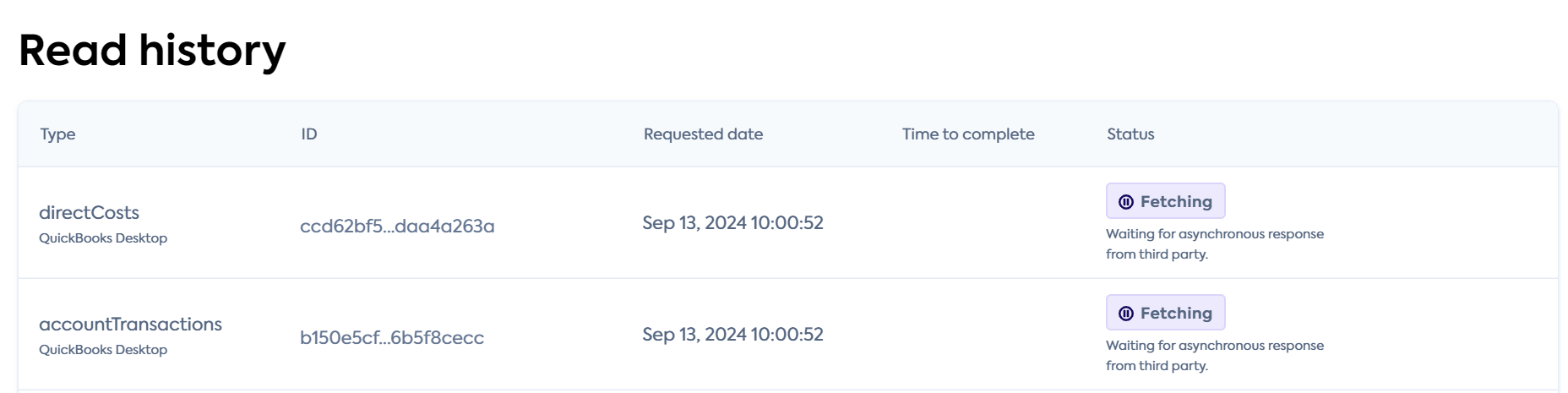
We have summarized the possible reasons for the message and available resolutions in the table below.
| Potential issue | Surfaced in connectionConnection A link between a Codat company and a data source (like an accounting platform). Each connection represents authorized access to pull or push data from that platform. errors? | User action to resolve |
|---|---|---|
| The machine that has QBD and the Web Connector installed is switched off | No | Turn on the machine |
| The Web Connector application is closed | No | Open the Web Connector |
| The Web Connector's "Auto-run" feature has been disabled | Yes | Tick the "Auto-Run" box on the relevant connectionConnection A link between a Codat company and a data source (like an accounting platform). Each connection represents authorized access to pull or push data from that platform. row in the Web Connector |
| The open QBD companyCompany In Codat, a company represents your customer's business entity. Companies can have multiple connections to different data sources. file is different from the one we are trying to syncSync The process of fetching the latest data from a connected data source. Syncs can be triggered manually or run automatically on a schedule. data with | Yes | Close QuickBooks Desktop |
| The user who created the connectionConnection A link between a Codat company and a data source (like an accounting platform). Each connection represents authorized access to pull or push data from that platform. opened the QBD companyCompany In Codat, a company represents your customer's business entity. Companies can have multiple connections to different data sources. file on a machine that's different to the machine where they installed the Web Connector | Yes | Log out of all other instances of QuickBooks Desktop |