Test your Xero integration
Create a Xero Demo Company and successfully access its sandbox data through Codat's Xero integration
When you've set up your Xero integration, you're ready to test the authorization process by connecting a companyCompany In Codat, a company represents your customer's business entity. Companies can have multiple connections to different data sources. to test data in Xero. Codat recommends that you do this before sending any LinkLink The authorization flow that allows end users to connect their accounting, banking, or commerce platforms to your application via Codat. URLs to your customers.
To test your integration, you'll need to:
- Set up a test companyCompany In Codat, a company represents your customer's business entity. Companies can have multiple connections to different data sources. in the Codat Portal.
- Create a demo companyCompany In Codat, a company represents your customer's business entity. Companies can have multiple connections to different data sources. in Xero.
- Generate a LinkLink The authorization flow that allows end users to connect their accounting, banking, or commerce platforms to your application via Codat. URL.
- Using LinkLink The authorization flow that allows end users to connect their accounting, banking, or commerce platforms to your application via Codat., try out the process of connecting your test companyCompany In Codat, a company represents your customer's business entity. Companies can have multiple connections to different data sources. to your demo companyCompany In Codat, a company represents your customer's business entity. Companies can have multiple connections to different data sources. in Xero.
Prerequisites
Make sure that you've set up your Xero integration.
Create a demo Xero companyCompany In Codat, a company represents your customer's business entity. Companies can have multiple connections to different data sources.
-
Log in to Xero using the credentials for your developer account.
-
Follow the instructions in Use the demo company to access or create a demo companyCompany In Codat, a company represents your customer's business entity. Companies can have multiple connections to different data sources..
Create a companyCompany In Codat, a company represents your customer's business entity. Companies can have multiple connections to different data sources. and linkLink The authorization flow that allows end users to connect their accounting, banking, or commerce platforms to your application via Codat. it to Xero
Create a test companyCompany In Codat, a company represents your customer's business entity. Companies can have multiple connections to different data sources. in the Codat Portal and connect it to your demo Xero companyCompany In Codat, a company represents your customer's business entity. Companies can have multiple connections to different data sources..
-
In the navigation bar, select Companies, then click New companyCompany In Codat, a company represents your customer's business entity. Companies can have multiple connections to different data sources..
-
Enter a name for your test companyCompany In Codat, a company represents your customer's business entity. Companies can have multiple connections to different data sources., such as
xero-test, then click Add. Copy the LinkLink The authorization flow that allows end users to connect their accounting, banking, or commerce platforms to your application via Codat. URL for your test companyCompany In Codat, a company represents your customer's business entity. Companies can have multiple connections to different data sources.. -
Enter the LinkLink The authorization flow that allows end users to connect their accounting, banking, or commerce platforms to your application via Codat. URL into a browser. LinkLink The authorization flow that allows end users to connect their accounting, banking, or commerce platforms to your application via Codat. for your integration is displayed.
-
Follow the instructions in LinkLink The authorization flow that allows end users to connect their accounting, banking, or commerce platforms to your application via Codat.; make sure you select Xero as the integration to connect.
-
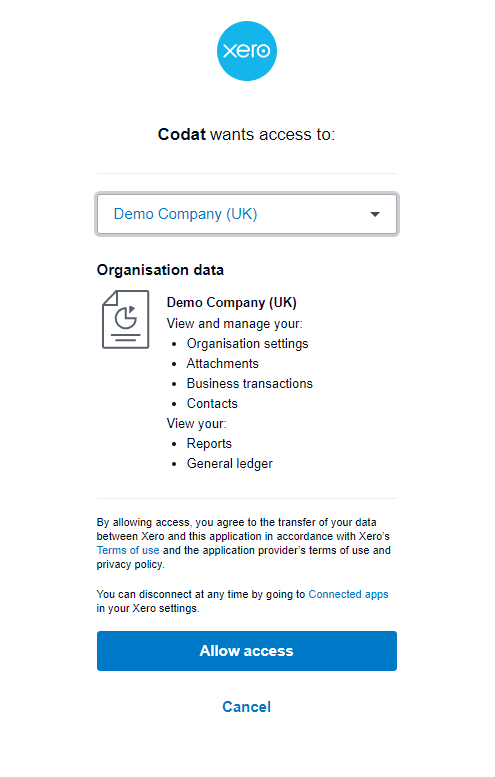
You might be asked to select an organization. Select the demo companyCompany In Codat, a company represents your customer's business entity. Companies can have multiple connections to different data sources. you created in the preceding task, then click Allow access.
-
When you've completed all the steps in LinkLink The authorization flow that allows end users to connect their accounting, banking, or commerce platforms to your application via Codat., you can close the browser tab or window.
Viewing test data from Xero in Codat
View test data from the Xero demo companyCompany In Codat, a company represents your customer's business entity. Companies can have multiple connections to different data sources. in the Codat Portal.
-
Go to the Companies page and select the test companyCompany In Codat, a company represents your customer's business entity. Companies can have multiple connections to different data sources. you created earlier and linked with Xero.
-
View the test data from Xero under the Accounting tab.
If you don't see any test data, you can check whether the syncSync The process of fetching the latest data from a connected data source. Syncs can be triggered manually or run automatically on a schedule. completed successfully. From the Companies page, click Read history. Also, check that the supported data types are set to Fetch on first linkLink The authorization flow that allows end users to connect their accounting, banking, or commerce platforms to your application via Codat. in Settings > Data types.
What's next?
Next, you might want to:
- Edit your syncSync The process of fetching the latest data from a connected data source. Syncs can be triggered manually or run automatically on a schedule. settings to change which data types to read from Xero.
- Try out the Write APIAPI A set of rules and protocols that allows different software applications to communicate with each other. Codat provides APIs for accessing financial data from accounting, banking, and commerce platforms. to create or edit data within Xero.
It's not possible to create banking transactions within Xero demo companies. To test this functionality, you'll need to sign up to a free trial or create a paid Xero organization.