Set up the QuickBooks Online Bank Feeds integration
Set up our integration with QuickBooks Online Bank Feeds
Set up the QuickBooks Online Bank FeedsBank Feeds A Codat product that enables automatic synchronization of bank transaction data into a company's accounting software. integration to let your SMBSMB The primary customer segment that Codat helps businesses serve, typically companies with annual revenues under $500 million. customers connect source bank accounts in your application to target accounts in QuickBooks Online (QBO).
Prerequisites
Before setting up the integration, make sure that:
- Your Solutions Engineer has provided you with access to the QuickBooks Online Bank FeedsBank Feeds A Codat product that enables automatic synchronization of bank transaction data into a company's accounting software. integration.
- SMBSMB The primary customer segment that Codat helps businesses serve, typically companies with annual revenues under $500 million. users who will connect to QBO Bank FeedsBank Feeds A Codat product that enables automatic synchronization of bank transaction data into a company's accounting software. are located in the US and Canada only.
- In the Codat Portal, you've enabled Bank accounts and Bank transactions in your Data type settings.
- You've customized the QBO Bank FeedsBank Feeds A Codat product that enables automatic synchronization of bank transaction data into a company's accounting software. LinkLink The authorization flow that allows end users to connect their accounting, banking, or commerce platforms to your application via Codat. UI for your institution.
Enable the QBO Bank FeedsBank Feeds A Codat product that enables automatic synchronization of bank transaction data into a company's accounting software. integration
- In the Codat Portal, go to Settings > Integrations > Bank feedsBank Feeds A Codat product that enables automatic synchronization of bank transaction data into a company's accounting software. to view the Bank feedsBank Feeds A Codat product that enables automatic synchronization of bank transaction data into a company's accounting software. integrations page.
- Click Set up next to QuickBooks Online Bank FeedsBank Feeds A Codat product that enables automatic synchronization of bank transaction data into a company's accounting software..
- Use the toggle to set the integration to Enabled.
Enabling the integration won't make it visible in the LinkLink The authorization flow that allows end users to connect their accounting, banking, or commerce platforms to your application via Codat. flow. Instead, SMBSMB The primary customer segment that Codat helps businesses serve, typically companies with annual revenues under $500 million. users connect directly via a LinkLink The authorization flow that allows end users to connect their accounting, banking, or commerce platforms to your application via Codat. URL.
Add a custom callout to the LinkLink The authorization flow that allows end users to connect their accounting, banking, or commerce platforms to your application via Codat. Site
You can add a custom text callout, in both French and English, to the QBO Bank FeedsBank Feeds A Codat product that enables automatic synchronization of bank transaction data into a company's accounting software. LinkLink The authorization flow that allows end users to connect their accounting, banking, or commerce platforms to your application via Codat. UI. These can provide additional guidance to your SMBSMB The primary customer segment that Codat helps businesses serve, typically companies with annual revenues under $500 million. users on connecting their bank accounts to QBO.
-
In the Codat Portal, go to Settings > Integrations > Bank feedsBank Feeds A Codat product that enables automatic synchronization of bank transaction data into a company's accounting software. to view the Bank feedsBank Feeds A Codat product that enables automatic synchronization of bank transaction data into a company's accounting software. integrations page.
-
Click Manage next to QuickBooks Online Bank FeedsBank Feeds A Codat product that enables automatic synchronization of bank transaction data into a company's accounting software..
-
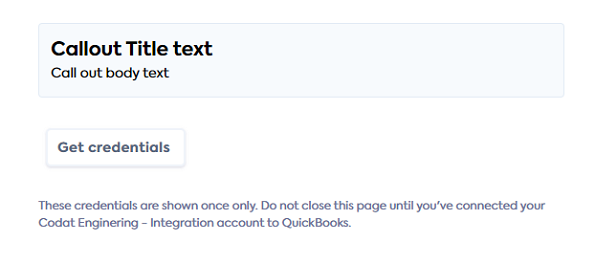
Enter text in the Callout title and Callout body fields (maximum of 50 and 150 characters respectively). Only plain text is supported.
Localization optionsYou can also enter French translations for the callout title and body.
-
Click Save.
The callout is displayed in a gray box at the bottom of the QBO Bank FeedsBank Feeds A Codat product that enables automatic synchronization of bank transaction data into a company's accounting software. LinkLink The authorization flow that allows end users to connect their accounting, banking, or commerce platforms to your application via Codat. UI, above the Get credentials button. For example:
Add a "Connect bank feedsBank Feeds A Codat product that enables automatic synchronization of bank transaction data into a company's accounting software." button to your application
Next, add a button or linkLink The authorization flow that allows end users to connect their accounting, banking, or commerce platforms to your application via Codat. to your application that prompts your SMBSMB The primary customer segment that Codat helps businesses serve, typically companies with annual revenues under $500 million. users to connect their bank accounts to QBO. Use an appropriate call-to-action, such as Connect account to QuickBooks.
See the next procedure for details on the functionality to provide.
Create a companyCompany In Codat, a company represents your customer's business entity. Companies can have multiple connections to different data sources. and data connectionConnection A link between a Codat company and a data source (like an accounting platform). Each connection represents authorized access to pull or push data from that platform., then add bank accounts
-
When the SMBSMB The primary customer segment that Codat helps businesses serve, typically companies with annual revenues under $500 million. user clicks the button or linkLink The authorization flow that allows end users to connect their accounting, banking, or commerce platforms to your application via Codat. you added, create a companyCompany In Codat, a company represents your customer's business entity. Companies can have multiple connections to different data sources. for them using the Create company endpoint:
POST https://api.codat.io/companiesRequest body{
"name": "COMPANY_NAME"
}The endpoint returns a JSON response containing the companyCompany In Codat, a company represents your customer's business entity. Companies can have multiple connections to different data sources.
idand theredirectURL. -
Using the Create a data connection endpoint, create a data connectionConnection A link between a Codat company and a data source (like an accounting platform). Each connection represents authorized access to pull or push data from that platform. to QBO Bank FeedsBank Feeds A Codat product that enables automatic synchronization of bank transaction data into a company's accounting software. for the companyCompany In Codat, a company represents your customer's business entity. Companies can have multiple connections to different data sources..
POST https://api.codat.io/companies/COMPANY_ID/connectionsIn the request body specify
hcwsas theplatformKey:{
"platformKey": "hcws"
}The endpoint returns a
200response. The body contains adataConnectionobject inPendingAuthstatus and alinkUrlcontaining a one-time password (otp) that expires after one hour.{
"id": "7baba7cc-4ae0-48fd-a617-98d55a6fc008",
"integrationId": "6b113e06-e818-45d7-977b-8e6bb3d01269",
"sourceId": "56e6575a-3f1f-4918-b009-f7535555f0d6",
"platformName": "QuickBooks Online Bank Feeds",
"linkUrl": "https://link-api.codat.io/companies/COMPANY_ID/connections/CONNECTION_ID/start?otp=742271", // expires after 1h
"status": "PendingAuth",
"created": "2022-09-01T10:21:57.0807447Z",
"sourceType": "BankFeed"
} -
Using the POST /bankFeedAccounts endpoint, add one or more source bank accounts. These are the accounts the SMBSMB The primary customer segment that Codat helps businesses serve, typically companies with annual revenues under $500 million. user will be able to connect to QBO.
POST /companies/{companyId}/connections/{connectionId}/connectionInfo/bankFeedAccountsIn the request body, specify a bank account (all fields shown are required):
Example request body: add a checking account{
"id": "ac-001",
"accountName": "account-001",
"accountType": "checking",
"accountNumber": "12345670",
"sortCode": "12-34-56",
"currency": "USD",
"balance": 4002 // can be 0
}The endpoint returns a
200response and the created bank account. -
Redirect the SMBSMB The primary customer segment that Codat helps businesses serve, typically companies with annual revenues under $500 million. user to the
linkUrlreturned in the response from the Create a data connection endpoint (see step 2).Link URL expiryFor security reasons, the
linkUrlwill expire one hour after it was generated. -
The SMBSMB The primary customer segment that Codat helps businesses serve, typically companies with annual revenues under $500 million. user opens the
linkUrlin their browser to load the QBO Bank FeedsBank Feeds A Codat product that enables automatic synchronization of bank transaction data into a company's accounting software. LinkLink The authorization flow that allows end users to connect their accounting, banking, or commerce platforms to your application via Codat. UI. -
They can now connect their chosen bank accounts to QuickBooks Online.
Do not hardcode the linkUrl into your application code. It is unique to the originating customer and must not be shared with other users.
Retrieve bank account status and information
You can use the GET /connectionInfo/bankFeedAccounts endpoint to view the following information for a data connectionConnection A link between a Codat company and a data source (like an accounting platform). Each connection represents authorized access to pull or push data from that platform.:
- Available source bank accounts—the accounts that the SMBSMB The primary customer segment that Codat helps businesses serve, typically companies with annual revenues under $500 million. user can connect to QBO.
- The connectionConnection A link between a Codat company and a data source (like an accounting platform). Each connection represents authorized access to pull or push data from that platform. status of the available source bank accounts (either
pending,connected, ordisconnected). - The number of connected bank accounts for a particular data connectionConnection A link between a Codat company and a data source (like an accounting platform). Each connection represents authorized access to pull or push data from that platform..
GET /connections/{connectionId}/connectionInfo/bankFeedAccounts
Update an existing source bank account for a companyCompany In Codat, a company represents your customer's business entity. Companies can have multiple connections to different data sources.
You can use the PATCH /connectionInfo/bankFeedAccounts/{bankAccountId} endpoint to update an existing source bank account for a companyCompany In Codat, a company represents your customer's business entity. Companies can have multiple connections to different data sources. and data connectionConnection A link between a Codat company and a data source (like an accounting platform). Each connection represents authorized access to pull or push data from that platform.. It's only possible to update the accountName field with this endpoint.
Provide the details of the source bank account you want to update as request parameters.
PATCH /companies/{companyId}/connections/{connectionId}/connectionInfo/bankFeedAccounts/{bankAccountId}
{
  "id": "acc-002", // required id of bank account to update
  "accountName": "updated-account-name",
  "sortCode": "123456",
  "accountType": "Credit",
  "accountNumber": "12345670",
  "currency": "USD",
  "balance": 99.99
}
Add new source bank accounts for a companyCompany In Codat, a company represents your customer's business entity. Companies can have multiple connections to different data sources.
You can add new source bank accounts to an existing companyCompany In Codat, a company represents your customer's business entity. Companies can have multiple connections to different data sources. and data connectionConnection A link between a Codat company and a data source (like an accounting platform). Each connection represents authorized access to pull or push data from that platform.. This makes those bank accounts available to the SMBSMB The primary customer segment that Codat helps businesses serve, typically companies with annual revenues under $500 million. user to connect to.
-
Send a request to the PUT /connectionInfo/bankFeedAccounts endpoint and specify the bank accounts you want to add in the request body.
PUT /companies/{companyId}/connections/{connectionId}/connectionInfo/bankFeedAccountsRequest body:
[
  {
    "id": "acc-003",
    "accountName": "account-0003",
    "sortCode": "123456",
    "accountType": "Debit",
    "accountNumber": "987654",
    "currency": "GBP",
    "balance": 219.23
  }
]
-
The original
linkURLfor the companyCompany In Codat, a company represents your customer's business entity. Companies can have multiple connections to different data sources. and data connectionConnection A link between a Codat company and a data source (like an accounting platform). Each connection represents authorized access to pull or push data from that platform. contained anotpwith a one hour expiration window. If this has passed, you'll need to generate a newlinkUrl. To do this, call the List connections endpoint to obtain a newlinkUrlfor the specified companyCompany In Codat, a company represents your customer's business entity. Companies can have multiple connections to different data sources. and data connectionConnection A link between a Codat company and a data source (like an accounting platform). Each connection represents authorized access to pull or push data from that platform.. -
Redirect the SMBSMB The primary customer segment that Codat helps businesses serve, typically companies with annual revenues under $500 million. user to the new
linkUrlto enable them to connect the new bank account to QBO.
Read next
Understand how the SMB user connects their accounts to QBO.