Sync transactions
Record transactions in your customer's accounting software and monitor the progress of dataset syncs
SyncSync The process of fetching the latest data from a connected data source. Syncs can be triggered manually or run automatically on a schedule. transactions
Once you have created your customer's expense transaction data, we automatically initiate a syncSync The process of fetching the latest data from a connected data source. Syncs can be triggered manually or run automatically on a schedule. that records the expenses in the customer's accounting software.
You can continue writing new expenses to Codat while a syncSync The process of fetching the latest data from a connected data source. Syncs can be triggered manually or run automatically on a schedule. is ongoing.
Check syncSync The process of fetching the latest data from a connected data source. Syncs can be triggered manually or run automatically on a schedule. status
Once you have initiated the syncSync The process of fetching the latest data from a connected data source. Syncs can be triggered manually or run automatically on a schedule., you may want to check whether the syncSync The process of fetching the latest data from a connected data source. Syncs can be triggered manually or run automatically on a schedule. was completed successfully and view the details of any errors that may have occurred.
WebhookWebhook An automated notification sent from Codat to your application when specific events occur, such as when data syncs complete or connections change status. events
We recommend you use webhooksWebhook An automated notification sent from Codat to your application when specific events occur, such as when data syncs complete or connections change status. to listen to events and track the syncSync The process of fetching the latest data from a connected data source. Syncs can be triggered manually or run automatically on a schedule. status. To set up a webhook consumer, navigate to Settings > WebhooksWebhook An automated notification sent from Codat to your application when specific events occur, such as when data syncs complete or connections change status. > Configure consumer in the Codat Portal and click Add endpoint that listens to the following events:
- Expenses syncSync The process of fetching the latest data from a connected data source. Syncs can be triggered manually or run automatically on a schedule. failed event of
SyncFailedtype is triggered if any failures occurred during the syncSync The process of fetching the latest data from a connected data source. Syncs can be triggered manually or run automatically on a schedule. process. - Expenses syncSync The process of fetching the latest data from a connected data source. Syncs can be triggered manually or run automatically on a schedule. completed event of
SyncCompletedtype is triggered when a syncSync The process of fetching the latest data from a connected data source. Syncs can be triggered manually or run automatically on a schedule. completes.
You can read more about webhooksWebhook An automated notification sent from Codat to your application when specific events occur, such as when data syncs complete or connections change status. at Codat and various events we offer to monitor.
Sync status codes
| Code | Reason |
|---|---|
| 1000 | In progress |
| 1010 | In progress (Long running - over ten minutes) |
| 2000 | Success (Data written) |
| 2040 | Success (No data written) |
| 4000 | Configuration error |
| 4040 | CompanyCompany In Codat, a company represents your customer's business entity. Companies can have multiple connections to different data sources. deleted/de-authorized |
| 4220 | CompanyCompany In Codat, a company represents your customer's business entity. Companies can have multiple connections to different data sources. deleted/de-authorized |
| 4260 | Accounting software billing expiry |
| 5000 | Generic server error |
| 5080 | Duplication protection |
| 5120 | Data processing error |
| 5130 | Data write error |
SyncSync The process of fetching the latest data from a connected data source. Syncs can be triggered manually or run automatically on a schedule. status via APIAPI A set of rules and protocols that allows different software applications to communicate with each other. Codat provides APIs for accessing financial data from accounting, banking, and commerce platforms.
Alternatively, you can check the syncSync The process of fetching the latest data from a connected data source. Syncs can be triggered manually or run automatically on a schedule. status via our APIAPI A set of rules and protocols that allows different software applications to communicate with each other. Codat provides APIs for accessing financial data from accounting, banking, and commerce platforms. using any of the following endpoints:
- Latest sync status to check the status of the last initiated syncSync The process of fetching the latest data from a connected data source. Syncs can be triggered manually or run automatically on a schedule..
- Last successful sync to view the most recent syncSync The process of fetching the latest data from a connected data source. Syncs can be triggered manually or run automatically on a schedule. that completed successfully.
- List sync statuses to display status details of all syncsSync The process of fetching the latest data from a connected data source. Syncs can be triggered manually or run automatically on a schedule. for a specified companyCompany In Codat, a company represents your customer's business entity. Companies can have multiple connections to different data sources..
- Get sync status to check the status details of a specified syncSync The process of fetching the latest data from a connected data source. Syncs can be triggered manually or run automatically on a schedule..
- Request URL
- Sync Successful
- Sync Failed
GET https://api.codat.io/companies/{companyId}/sync/expenses/syncs/syncId/status
{
  "companyId": "71c1fdae-e104-4668-8a4c-7f795aafc2a4",
  "syncId": "ea86bb15-7a89-4b2d-a18d-626cc0e28137",
  "syncStatusCode": 2000,
  "syncStatus": "Complete",
  "errorMessage": "",
  "syncExceptionMessage": "",
  "syncUtc": "2022-08-03T01:30:09.0797213Z",
  "dataPushed": true
}
{
  "companyId": "8cba59e5-ae8a-418b-918a-09f90850e8d8",
  "syncId": "2b5d5fd1-f4b2-49de-98c3-ca37a0dcd8cd",
  "syncStatusCode": 5130,
  "syncStatus": "PushError",
  "errorMessage": "An error occurred in a downstream service. Correlation ID: 1f6ab1bc-58c8-4c1a-a654-86464b065f69. Message:  Feed Connection failed(409): The AccountToken, AccountId or AccountNumber is already connected to another Xero Bank Account in the selected Xero Organization.",
  "syncExceptionMessage": "An error occurred in a downstream service. Correlation ID: 62f0f708-ae37-4b3a-81b1-41f1361f0b40. Message:  Feed Connection failed(409): The AccountToken, AccountId or AccountNumber is already connected to another Xero Bank Account in the selected Xero Organization.",
  "syncUtc": "2022-08-03T01:11:33.6279333Z",
  "dataPushed": false
}
Transaction status
If you want to check the status of individual transactions, use the Get sync transaction endpoint. It also returns errors associated with the transaction if it was unsuccessful.
Alternatively, use the List sync transactions endpoint to view statuses for all transactions in a specified syncSync The process of fetching the latest data from a connected data source. Syncs can be triggered manually or run automatically on a schedule..
- Request URL
- Successful Transactions
- Failed Transactions
GET https://api.codat.io/companies/{companyId}/sync/expenses/syncs/{syncId}/transactions
{
  "results": [
    {
      "transactionId": "0331d9b9-a1cd-4d46-84d3-5a17dc6ad43e",
      "status": "Completed",
      "integrationType": "bankfeeds"
    },
    {
      "transactionId": "0331d9b9-a1cd-4d46-84d3-5a17dc6ad43e",
      "status": "Completed",
      "integrationType": "expense"
    }
  ],
  "pageNumber": 1,
  "pageSize": 100,
  "totalResults": 134,
  "_links": {
    "current": {
      "href": "/companies/0c690bba-9fdc-435b-9790-b22928ce1c96/syncs/3f652c19-b6d8-477a-a853-5b726d145cde/transactions?page=1&pageSize=100"
    },
    "self": {
      "href": "/companies/0c690bba-9fdc-435b-9790-b22928ce1c96/syncs/3f652c19-b6d8-477a-a853-5b726d145cde/transactions"
    },
    "next": {
      "href": "/companies/0c690bba-9fdc-435b-9790-b22928ce1c96/syncs/3f652c19-b6d8-477a-a853-5b726d145cde/transactions?page=2&pageSize=100"
    }
  }
}
{
  "results": [
    {
      "transactionId": "0331d9b9-a1cd-4d46-84d3-5a17dc6ad43e",
      "status": "PushError",
      "message": "An error occurred in a downstream service. Correlation ID: 0e7ee4bc-50d2-4e07-8f9e-25fdda6bc004. Message:  Feed Connection failed(409): The AccountToken, AccountId or AccountNumber is already connected to another Xero Bank Account in the selected Xero Organization.",
      "integrationType": "bankfeeds"
    },
    {
      "transactionId": "0331d9b9-a1cd-4d46-84d3-5a17dc6ad43e",
      "status": "PushError",
      "message": "An error occurred in a downstream service. Correlation ID: 0e7ee4bc-50d2-4e07-8f9e-25fdda6bc004. Message:  Feed Connection failed(409): The AccountToken, AccountId or AccountNumber is already connected to another Xero Bank Account in the selected Xero Organization.",
      "integrationType": "bankfeeds"
    }
  ],
  "pageNumber": 1,
  "pageSize": 100,
  "totalResults": 134,
  "_links": {
    "current": {
      "href": "/companies/0c690bba-9fdc-435b-9790-b22928ce1c96/syncs/3f652c19-b6d8-477a-a853-5b726d145cde/transactions?page=1&pageSize=100"
    },
    "self": {
      "href": "/companies/0c690bba-9fdc-435b-9790-b22928ce1c96/syncs/3f652c19-b6d8-477a-a853-5b726d145cde/transactions"
    },
    "next": {
      "href": "/companies/0c690bba-9fdc-435b-9790-b22928ce1c96/syncs/3f652c19-b6d8-477a-a853-5b726d145cde/transactions?page=2&pageSize=100"
    }
  }
}
Monitor syncSync The process of fetching the latest data from a connected data source. Syncs can be triggered manually or run automatically on a schedule. status
Select the Codat Portal Sync For Expenses menu item to monitor the status of your syncsSync The process of fetching the latest data from a connected data source. Syncs can be triggered manually or run automatically on a schedule., as well as review detailed logs and error messages. This helps your support team to resolve common issues with the customer's settings or actions.
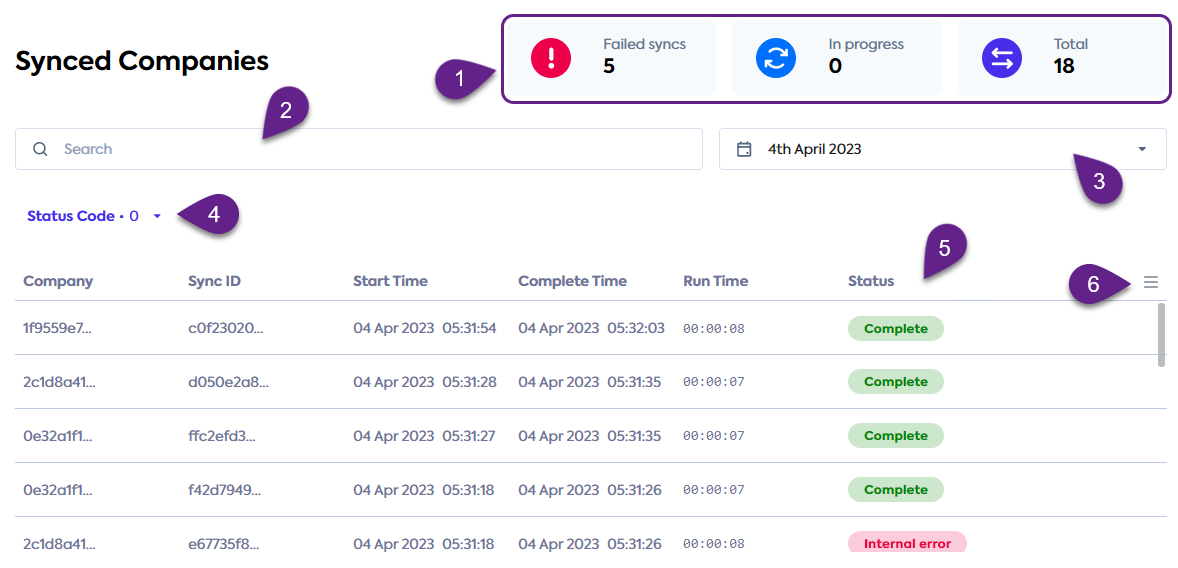
- Check the dashboard (1) for a visual summary of syncSync The process of fetching the latest data from a connected data source. Syncs can be triggered manually or run automatically on a schedule. totals.
- Use the search bar (2) to narrow down the records by syncSync The process of fetching the latest data from a connected data source. Syncs can be triggered manually or run automatically on a schedule. ID or companyCompany In Codat, a company represents your customer's business entity. Companies can have multiple connections to different data sources. ID.
- Display the syncSync The process of fetching the latest data from a connected data source. Syncs can be triggered manually or run automatically on a schedule. history for a specific period by indicating a date range (3).
- Review the possible statuses of the syncsSync The process of fetching the latest data from a connected data source. Syncs can be triggered manually or run automatically on a schedule. and filter the records by their status code (4).
- Use the menu (6) to sort and amend the syncSync The process of fetching the latest data from a connected data source. Syncs can be triggered manually or run automatically on a schedule. history (5) table as needed.
💡 Tips and traps
- SyncsSync The process of fetching the latest data from a connected data source. Syncs can be triggered manually or run automatically on a schedule. are shown as failed if any of the included items fail to write. Therefore, if a syncSync The process of fetching the latest data from a connected data source. Syncs can be triggered manually or run automatically on a schedule. contains a mix of failed and successfully written records, it will still be marked as failed.
- SyncSync The process of fetching the latest data from a connected data source. Syncs can be triggered manually or run automatically on a schedule. history does not display the date range for data read from the platform that is used in the syncSync The process of fetching the latest data from a connected data source. Syncs can be triggered manually or run automatically on a schedule..
Read next
- Attach receipts to the expense transaction using attachment upload
- Review our FAQ to find out more about Expenses
- Try Expenses in our interactive API reference